Print Daemon · printing · early access
Print from your cloud to your customers' warehouse printers
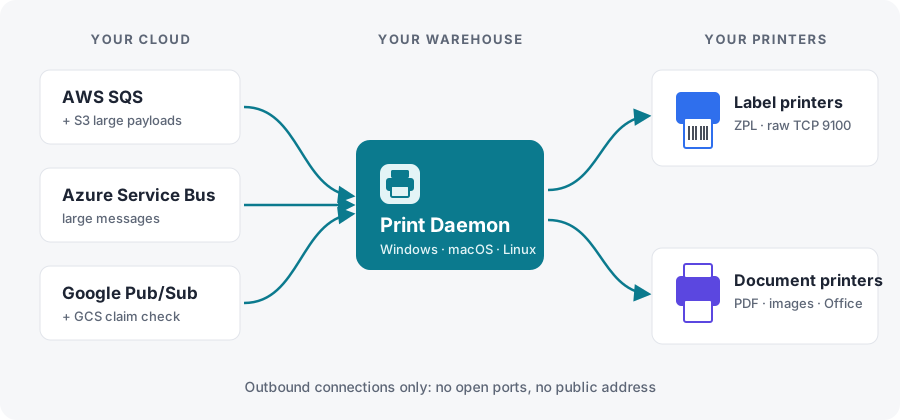
Your SaaS puts a print job on a queue. Print Daemon, running at the site, pulls it and prints it on the right label or document printer. No VPN, no open ports.
Early access. Print Daemon works end to end in its automated tests, against simulated printers and queues: the SQS, Service Bus and Pub/Sub paths and the service installs have not yet run on real systems. The release below comes with a time-limited evaluation license. We are looking for vendors to pilot it with real warehouses before general release.
What it prints
Labels and documents, on the printers your customers already have
Zebra label printers
ZPL and raw jobs over TCP 9100 or an OS queue. All labels of a job go out as one print job, so batches never interleave.
Office printers
PDF, images and text through CUPS or the Windows spooler, or driverless over IPP to network printers that accept PDF.
Office documents
Word, Excel and PowerPoint files are converted with LibreOffice. No Microsoft Office needed.
Any printhead resolution
ZPL designed for 203 dpi printed on a 300 or 600 dpi printer is rescaled only when they clearly differ.
Printer discovery
Finds printers on the site's network (SNMP, IPP, mDNS) without sending anything to unidentified devices.
Large jobs
SQS with S3 payloads (Java extended client compatible), Service Bus Premium up to 100 MB, Pub/Sub with a GCS claim check.
Built for unattended sites
Built so jobs aren't lost or printed twice
Deduplicated
A job the queue delivers again after a lost acknowledgement isn't printed again.
Retried, then parked
Offline printers are retried with backoff; jobs that can't print wait in a local list for an operator.
Fixed on site
From the local admin UI, staff change the printer, edit and re-send, or delete. Nothing re-sends by itself.
Integration
One JSON message per job
{
  "schemaVersion": 1,
  "jobId": "ship-778812-labels",
  "type": "zpl",
  "printer": { "id": "dock-1-zebra" },
  "copies": 1,
  "documents": [{ "data": "^XA^FO50,50^A0N,50,50^FDHello^FS^XZ" }]
}- Types: ZPL, raw, PDF, image, Office, text
- Send from your cloud with the queue's own SDK; the admin UI shows producer snippets for Java, TypeScript, Python and C#
- One queue or subscription per site; credentials from each cloud's standard chain
- Runs as a service (systemd, launchd, WinSW); one self-contained executable per platform, or Node.js 20.19 or later; outbound connections only
- Licensed with an offline signed key (
PD2.): nothing is sent anywhere. Without a valid license printing pauses and jobs wait in the queue, none lost; a trial never marks printed output
Full documentation (the daemon also serves it from its admin UI, at /docs/)
Download
Evaluate it at one site
One executable per platform, with the admin UI and the documentation inside it. It runs on the bundled evaluation license until you install your own key; the evaluation license expires, and printed output is never marked. LibreOffice (Office files), SumatraPDF and WinSW (Windows) are separate free downloads. macOS and Windows may warn that the executable is not signed; see the quick start in the archive.
Version 0.1.0
| Platform | File | Size | SHA-256 |
|---|---|---|---|
| Linux x64 | print-daemon-0.1.0-linux-x64.tar.gz | 43 MB | cb1f32696010… |
| Linux ARM64 | print-daemon-0.1.0-linux-arm64.tar.gz | 42 MB | f851fb7b0dc5… |
| macOS Apple silicon | print-daemon-0.1.0-darwin-arm64.tar.gz | 38 MB | a3a97ca6d2d1… |
| macOS Intel | print-daemon-0.1.0-darwin-x64.tar.gz | 40 MB | cfe8ccb47d86… |
| Windows x64 | print-daemon-0.1.0-win-x64.zip | 35 MB | 91463a2f1f64… |
Check a download with sha256sum -c SHA256SUMS --ignore-missing (macOS: shasum -a 256 -c): SHA256SUMS.
Pilot it with one of your warehouses
Tell us which queue you use and which printers your customer has; we'll help you set up the first site.